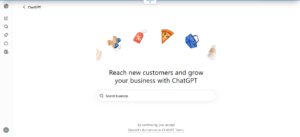
You can claim your business on ChatGPT through Business Hub, a beta OpenAI opened on November 10, 2026. Sign in to ChatGPT, search for your business, verify it by phone, email, DNS record or Shopify, then pass an identity check. You end up with a verified ChatGPT business profile you can edit, and it’s free at launch.
What you don’t get is a recommendation. OpenAI says claiming a profile guarantees no better placement or sales. Showing up in answers is a separate job, AI search optimization, and this guide covers both.
How customers find businesses through ChatGPT
BrightLocal says that in early 2026, 45% of consumers used ChatGPT or other generative AI tools for local business recommendations, a figure it repeats in a September 2026 study. The same study is the best look yet at what those answers contain. BrightLocal sells an AI visibility tracker, so weigh it accordingly, but its sample is large: 200,085 localized searches across ChatGPT, Google AI Mode and AI Overviews.
The picture is a short, shifting list. ChatGPT averaged 4.1 businesses per response. Repeat a prompt and only 23% of the results overlap on average, although a business that appears once shows up again about half the time. ChatGPT named a tracked business in 33% of searches, against 66% for Google Maps.
That makes consistency the goal in AI-powered business discovery. There’s no single ranking slot to win.
What a ChatGPT business profile actually is
ChatGPT can already describe your business whether or not you claim anything. OpenAI’s help page says it may show business information even without an agent and may use other sources, according to one summary of that page. OpenAI calls Business Hub a self-service way for businesses to contribute their information, so it’s the direct route to make ChatGPT recognize your business instead of leaving it to piece the details together.
Per DeltaV Digital’s walkthrough, you can edit your website link and description, pick a category, upload a logo and cover photo, and set delivery and return policies. OpenAI reviews each change before it goes live. Sellers can also add a product feed with prices and stock, or sync Shopify.
If you’ve searched for how to register your business on ChatGPT or how to get your business listed on ChatGPT, this is the route OpenAI offers. It’s separate from ChatGPT Business, the paid workspace plan for teams.
Who can claim, and how local listings work
OpenAI’s launch post says any eligible business located where ChatGPT is available can claim. Owners and authorized representatives can apply without an Enterprise agreement or an ads account.
A ChatGPT local business listing is the narrowest case. Local stores and restaurants can currently claim only an existing U.S. listing.
The Business Agent, a labeled chat that answers shopper questions, is limited at launch to eligible U.S. ecommerce and online service companies. An online business outside the U.S. may claim a profile where verification is supported, but not an agent.
Multi-location brands claim each location separately.
How to claim your business on ChatGPT, step by step
Step 1: Choose the owning account
The profile attaches to the ChatGPT account you’re signed in with. Use one the company controls, not a personal login that leaves with an employee. You can invite teammates or an agency later, and each should use their own account.
Step 2: Find your listing, or add it
Sign in, open Business Hub from the sidebar (or go to chatgpt.com/business-hub), and search for your business by name. Select the match, confirm the account and click Get Started, as VentureBeat’s walkthrough describes.
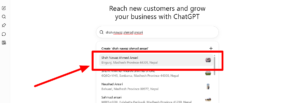
How to add a business to ChatGPT depends on its type. DeltaV says eligible online businesses may be offered the option to add a new listing, while local stores and restaurants can only claim one that already exists. If a listing shows Contact support, it’s locked, and OpenAI’s setup guide says to request help there.
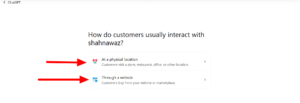
Step 3: Pick a verification method
OpenAI’s guide offers four routes, and Business Hub shows only the ones that fit your business. DeltaV describes how each works:
| Method | What happens |
|---|---|
| Business phone | You enter a code sent by text or automated call |
| Business email | You enter a code sent to the business inbox |
| Website domain | You add a DNS TXT record, then verify |
| Shopify | You connect your store and approve permissions |
Step 4: Get the DNS record right
DeltaV chose DNS and flagged the part that trips people up. The TXT value starts with openai-business-claim=, and you should paste it exactly. Many DNS providers add your root domain to the host field automatically, so pasting the full host name can create a doubled domain and a failed check.
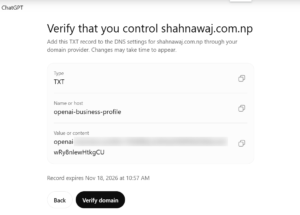
The record also expires, in DeltaV’s case the next afternoon, so generate a new one if it lapses. DNS can take minutes or hours to propagate.
Step 5: Pass the identity check
After approval, you must complete identity verification with Persona before you can publish changes, view insights or create an agent. DeltaV photographed a government ID, then saw an “Application in review” message with updates promised over a few days. The blue check appears only after approval.
The ID belongs to a person, not the company, so pick an owner or authorized representative who’ll stay.
Step 6: Finish the profile
Choose your category, correct every field under Edit business info, then add a logo, cover photo and policies. If someone else already claimed your business, DeltaV says to open the profile menu and choose Dispute ownership, which also requires identity verification.
How to make your business visible on ChatGPT
Claiming handles the profile. The rest of how to improve business visibility in AI search happens elsewhere, and BrightLocal’s advice is that most local SEO tactics carry over to AI visibility.
Let OpenAI’s search crawler in
To appear in ChatGPT search results, your site has to be readable by OAI-SearchBot. OpenAI recommends allowing it in robots.txt. Sites that opt out won’t be shown in ChatGPT search answers, though they can still appear as navigational links, and changes take about 24 hours to register. Check this before anything else, since a broad rule meant for scrapers can block it by accident.
Make your own website the clearest source
Business websites made up 93% of the unique domains BrightLocal saw cited, and 42% of the 1.97 million citations. Its advice is plain: keep your name, address and phone number consistent, give each location a clear page, and answer common customer questions on the site.
A fixed address helps too. In ChatGPT, storefronts were mentioned 33.7% of the time against 29.4% for service-area businesses.
Keep outside listings consistent
BrightLocal found Google Business Profile is hardly used by ChatGPT, which leans more on Yelp and Bing. Yelp alone accounted for 9.53% of citations across all three AI platforms. So a business listing on AI search engines means checking the directories ChatGPT actually reads, not only the ones Google does.
Where GEO and AEO fit
Marketers call this work Generative Engine Optimization (GEO) or Answer Engine Optimization (AEO). TechnologyAdvice notes the two overlap heavily, with no universal industry definition separating them: AEO usually means making information answer-ready, GEO making it citable in generated responses.
Don’t build two programs. TechnologyAdvice advises one AI visibility strategy, so treat ChatGPT SEO optimization as an AI SEO strategy that sits on top of ordinary local SEO. It isn’t automatic, though: BrightLocal found that success on Maps doesn’t necessarily lead to being named by an AI.
What the Business Hub dashboard shows
Business Hub reports aggregate activity over 28 days: website clicks, mentions and recurring topics. On day one, DeltaV’s dashboard showed 23 mentions and zero clicks. OpenAI’s tooltip says clicks don’t confirm visits or conversions, and DeltaV notes ChatGPT adds utm_source=chatgpt.com to links, which you can filter on in GA4.
It isn’t a full AI search visibility tool, either. OpenAI told Digiday that businesses don’t see prompts, and share of voice isn’t part of the beta. DeltaV’s advice is to add a separate tracking tool, since ChatGPT for business visibility is only partly measured here.
Quick answers
Can claiming get my business recommended by ChatGPT?
Not on its own. An OpenAI product lead told reporters that joining shouldn’t change how often a company appears, per DeltaV’s summary.
Will it stay free?
Digiday reported it’s free for now, and OpenAI’s vice president of monetization didn’t rule out a paid model.
Does it replace my Google Business Profile?
DeltaV says the two feed different systems, so keep both and keep the details identical.
If you run a single-location shop and have one hour, spend it before claiming anything: confirm your robots.txt isn’t blocking OAI-SearchBot, then make your address and phone number match on your website and your Yelp page. That leaves your own site and listings in better shape to get found on ChatGPT, and DeltaV puts the claim itself at about an hour of setup.